

How to Transition to a New MSP Without Disruption - The MSP Onboarding Blueprint
.png)
Finalizing your MSP selection is the semi-challenging first step in building a successful partnership. The real challenges exist in how smoothly you transition from your existing provider to the new MSP. The onboarding phase requires methodical planning, coordination and communication to ensure a smooth transition with minimal disruptions to daily operations. A poorly managed transition can lead to delays, outages and frustrated staff, placing strain on a relationship that is still in its infancy.
How Does MSP Onboarding and Transition Work?
Taking the time to develop a concise and structured onboarding plan guides the organization and the new MSP through the critical transition phase while mitigating risk. This onboarding plan should include clear timelines, communication channels and milestones that minimize service disruptions and ensure a smooth transition of operations. Plan for approximately 60 to 90 days to complete this milestone.
Phase 1: Initial Assessment and Planning
During the initial onboarding meeting, review current infrastructure, systems and services provided by the incumbent MSP to understand the scope of the transition. It may be helpful to hold an internal meeting first to fully grasp the environment and create actionable items for discussion, ensuring the MSP understands the criticality of each system. Target the first step of this transition to be completed within the first week after formalizing the partnership.
A gap analysis may also be helpful:
• Break down all IT services currently delivered by the incumbent MSP and internal team
• Have the new MSP list the services agreed upon in the contract
• Compare both lists to identify missing services and address them
• Confirm what the internal team will retain and what can be delegated to the MSP
Phase 2: Systems Integration
During integration, the MSP may require installation of hardware or software to facilitate access and management. These may be referred to as a jump box or poller. Depending on services committed to, this two to four week process may include:
• Event monitoring systems using Syslog, SNMP and related health data
• Remote access and management tools with agents installed on servers or endpoints
• VPN tunnels to secure management traffic between the facility and the MSP
• Multi-factor authentication for authentication of users, engineering staff and MSP
• Remote access VPN and remote desktop tools for access and administration
• Backup software for data backup and restoration
• Ticketing systems for tracking issues, incidents and support cases
• Patch management software for controlled deployment of updates
• Network monitoring or automation tools for configuration backup and resource graphing
• Endpoint Detection and Response tools for endpoint security and threat mitigation
• Email and web security tools for anti-phishing and web access protection
• Firewalls and IDS or IPS appliances for traffic filtering and intrusion prevention
• Firewall configurations defining filtering and protection parameters
• Professional Services Automation platforms for ticketing, project management, billing and client relationship management
• Remote Monitoring and Management platforms for monitoring, automation and alerts
Phase 3: Security Compliance Protocols
During systems integration, concurrently audit and plan for security measures to protect data and meet compliance requirements. This is a collaborative effort between the MSP security team and the organization’s compliance officer. In the span of a week or two, the MSP should be able to audit infrastructure and implement new protocols that may be required. The team should also set up monitoring and alerts for cyber security tools such as a Security Information and Event Management platform if included in the agreement. The team should verify compliance with governing bodies applicable to the organization such as GDPR, HIPAA and PCI DSS.
Phase 4: Employee Training and Knowledge Transfer
Employees and the MSP both need to be trained and briefed. Technical staff may attend training sessions to understand how tools operate or undergo ticketing system training. The MSP should provide documentation for employees to refer to for ongoing support.
The MSP also needs to be apprised of the existing environment. They require:
• Logical and physical network diagrams
• Credentials to devices
• WAN circuit information
• Cloud provider access
Armed with this information, the MSP should create a Standard Operating Procedure for the organization and share it with their teams. This document serves as rules of engagement and outlines how engineers should react when presented with certain situations. It defines escalation procedures and includes notification channels for the MSP to follow.
Phase 5: Final Testing and User Acceptance Testing
Once tools are deployed and applications are installed, the MSP should perform thorough performance and validation testing. The MSP verifies access to pertinent devices, validates monitoring systems, ensures the ticketing system is working as intended and confirms the SOP is created in accordance with established SLAs.
A small group from the organization should work closely with the MSP to test client-side services such as ticket creation or access to monitoring platforms. Identify and report issues and ensure they are addressed before signing off on completion of the User Acceptance Testing process.
Phase 6: Go Live and Full Transition
The go live date is a scheduled event to cut over services to the new MSP. Trigger the transition during a period of low utilization to ensure minimal impact on users. Once systems are activated and service is live, the MSP should enter a period of hyper care for the next week or so, closely monitoring performance and user feedback to address unforeseen issues.
Phase 7: Daily Support and Optimization
Ongoing support must remain exemplary and bottlenecks should be optimized. Issues can arise from communication breakdowns, security concerns, third party issues and service outages. By closely monitoring system performance, the MSP can address lingering challenges. Regular meetings such as the QBR highlight ongoing challenges and track them until resolved.
Key Benefits of a Structured MSP Transition Plan
Minimal Service Disruption
Clear timelines, milestones and low utilization cutover planning help reduce delays and avoid outages.
Operational Continuity
Systems integration ensures monitoring, ticketing, access controls and patch management are implemented for ongoing support.
Security and Compliance Alignment
Security audits, firewall rules, IDS or IPS deployments and compliance verification support operational integrity and governance requirements.
Faster Support Readiness
Employee training, knowledge transfer and documentation ensure users and engineers know how to work with the MSP from day one.
Stronger MSP Partnership Foundation
Methodical onboarding reduces friction and helps the relationship begin with clarity and coordination.
Smooth Transition vs Disruptive Transition
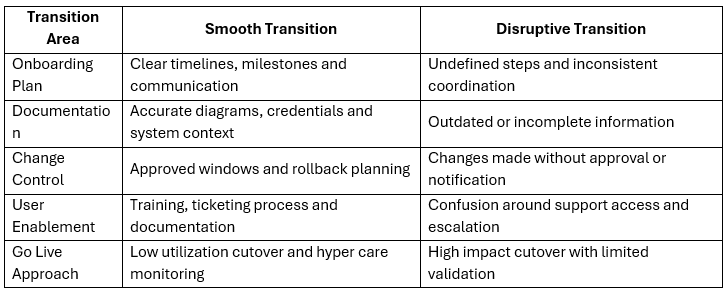
How to Transition to a New MSP Without Disruption
The following steps help create operational stability during MSP onboarding and IT service transition.
- Build a structured onboarding plan with timelines, milestones and communication channels
- Complete an internal environment review before the first onboarding meeting
- Perform a gap analysis comparing current services vs contracted services
- Plan systems integration for monitoring, access tools, ticketing and security platforms
- Coordinate security audits and compliance verification alongside integration
- Provide documentation, diagrams and access details required for MSP support readiness
- Require a Standard Operating Procedure that outlines rules of engagement and escalation
- Complete validation testing and User Acceptance Testing before go live
- Schedule go live during low utilization periods and confirm hyper care monitoring
See other articles: 'How to Measure MSP Performance' and 'What to Look for in a Service Level Agreement'
Key Takeaways
- A structured onboarding plan with timelines and milestones supports a smooth MSP transition
- Initial assessment and gap analysis prevent missing service coverage during cutover
- Systems integration enables monitoring, remote management, ticketing and patching
- Security audits and compliance verification support governance requirements
- Training, documentation and SOP development reduce delays and prevent miscommunication
FAQ
How long does an MSP transition typically take?
Plan for approximately 60 to 90 days to complete the transition milestone.
What should be included in an MSP onboarding plan?
A structured onboarding plan should include clear timelines, communication channels and milestones that minimize service disruptions.
Why is documentation important during MSP onboarding?
MSPs rely on documentation to understand infrastructure and support it correctly. Poorly written or outdated documentation can lead to incorrect assumptions and service disruptions.
What is User Acceptance Testing in an MSP transition?
User Acceptance Testing is a process where a small group from the organization tests client-side services such as ticket creation or access to monitoring platforms and confirms issues are addressed before signing off.
What is hyper care after MSP go live?
Hyper care is a period after go live where the MSP closely monitors system performance and user feedback to address unforeseen issues.

Popular reads below:
.png)
How to Measure MSP Performance (And What Metrics Actually Matter)
%20(1).png)
.png)
How MSPs Safeguard Businesses Against Modern Cyber Threats

What to Look for in a Service Level Agreement (SLA) When Hiring an MSP

Top 5 Security Mistakes Companies Make Before Hiring an MSP

10 Red Flags That Your MSP Isn’t Delivering True Value

Managed Services vs Break-Fix: How Reactive IT Creates Higher Costs and Operational Strain


